Works from CSV or workbook exports produced from SAP, IBM Maximo, Oracle ERP, Hexagon EAM, Infor, and other ERP, EAM, or CMMS systems. No direct integration or write-back is required — Review data requirements →
AssetMind AI: Asset-to-part intelligence engine

AssetMind AI — Asset-to-Part Linkage Diagnostic

Identify missing, weak, or ambiguous asset-to-part relationships from exported asset registers, equipment hierarchies, material master data, spare-parts lists, and work-order references without changing EAM, CMMS, or ERP records. The workflow starts from exported operational data, produces AssetMind AI Asset-to-Part Risk Report, and keeps source systems untouched.

Read-onlyDiagnostic
No ERPWrite-back
Source-filePurge after report generation
HumanReview before action
Evidence summary

Diagnostic evidence path

AssetMind AI: This engine path connects the operating problem, exported source data, diagnostic logic, evidence output, review boundary, and next action for Industrial IQ buyers. Inspect asset registers, equipment hierarchy, BOM references, criticality, and material links to find weak spare coverage before EAM cleanup or APM work.

Run This Engine
Review ownerThe operating, finance, procurement, maintenance, data, and governance leaders accountable for this diagnostic decision.
Input file contextTypical exported operational files, helpful optional fields, sample data, and mapped CSV or workbook evidence.
Diagnostic evidenceSource-backed findings, confidence tiers, score interpretation, report preview, review actions, and recurring-use path.
Recommended actionInspect the sample report, then run the matching engine with bounded exported operational data.
Executive decision snapshot

Problem, data, output, trust boundary, owner, and next action.

AssetMind AI keeps the product review concrete: operating problem, typical exports, output, review owner, trust boundary, and next action stay visible before upload.

Read-only diagnostics. Source files purged after report generation. Human review before action.
Problem diagnosed

Asset-to-Part Linkage Diagnostic

Data needed

asset register, asset hierarchy, equipment ID

Output produced

AssetMind AI Asset-to-Part Risk Report

System boundary

Read-only; no ERP/EAM write-back.

Review owner

Asset Integrity, Maintenance, Reliability, and Operations leaders

Next action

Run Snapshot, review sample report, or scope a pilot.

One platform, eight diagnostic engines

AssetMind AI is one engine inside the Industrial IQ platform.

The selected diagnostic is shown inside the broader Industrial IQ operating model: exported operational data, source-backed evidence, confidence tiers, reports, action tracking, and no ERP write-back.

Compare all engines
Product review card

One diagnostic decision, visible before upload.

AssetMind AI shows what source data can prove, which findings are ready for review, and what remains buyer-controlled after the report.

Input files to prepare

asset register, asset hierarchy, equipment ID, equipment status

First diagnostic question

Can your asset register prove which critical equipment has weak spare coverage or missing asset-to-part linkage?

Evidence returned

asset ID, part reference, criticality, asset status

Review owner

Asset Integrity, Maintenance, Reliability, and Operations leaders

Trust contract
Export-first Start from buyer-controlled CSV or workbook exports; no production integration is required for the first review.
Evidence before action Findings show source context, confidence, assumptions, limitations, and owner-review status.
Governed boundary No ERP write-back, no uncontrolled remediation, and human review before operational change.
Asset-to-part linkage

AssetMind AI makes its source-to-decision path visible before upload.

Asset hierarchy, BOM coverage, critical-spare gaps, and EAM readiness evidence.

InputAsset Id, Description
OutputAssetMind AI Asset-to-Part Risk Report
Trust boundaryRead-only diagnostic, no ERP write-back, confidence-tiered evidence, and human review before action.
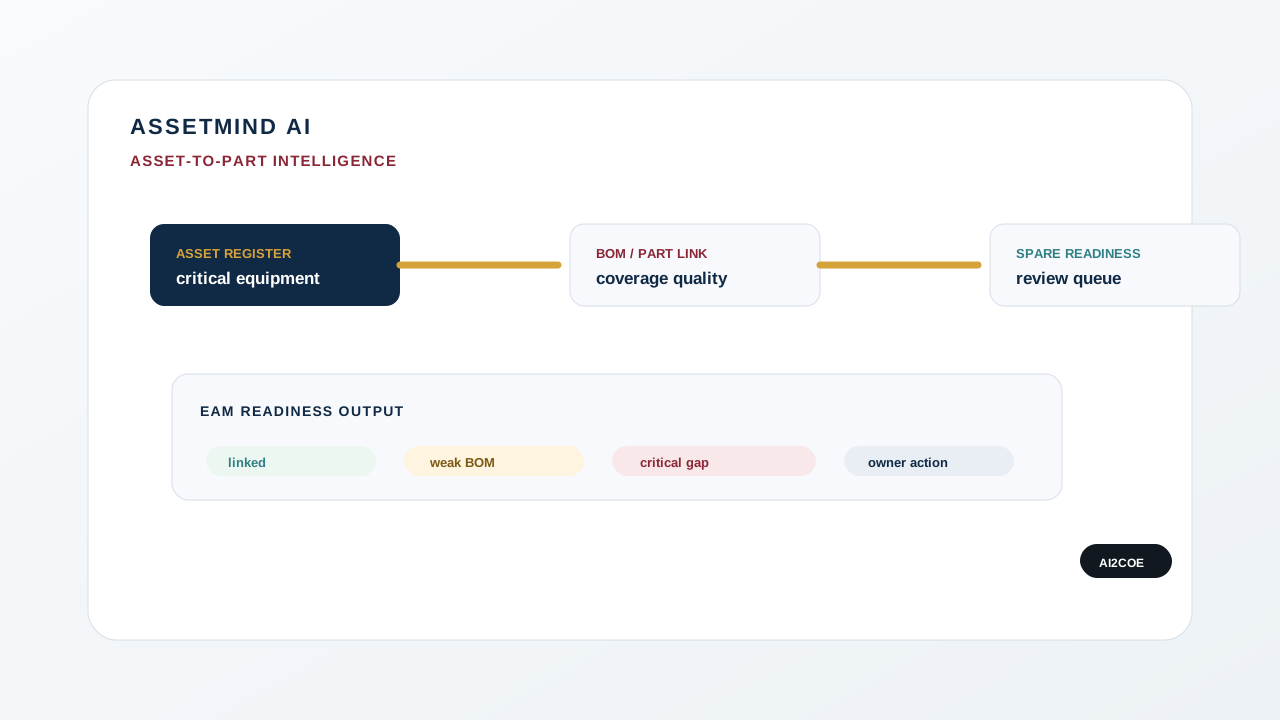
AssetMind AI diagnostic visual showing asset hierarchy, BOM coverage, critical spare gaps, and EAM readiness.
AssetMind AI connects equipment records, BOM coverage, and spare-part linkage into EAM readiness evidence.
Industrial Evidence Graph

AssetMind AI converts source records into governed evidence.

AssetMind AI follows the same Industrial IQ trace: exported files, field fit, diagnostic lens, confidence marker, human review, read-only boundary, and audit-ready action.

01 Source tile

Exported ERP, EAM, CMMS, inventory, procurement, finance, asset, or work-order records.

02 Evidence trace

Mapped fields, source rows, reason codes, and continuity from file to finding.

03 Diagnostic lens

Asset-to-Part Intelligence evaluates the operating question with controlled engine logic.

04 Confidence marker

High, moderate, review-required, or insufficient evidence states use labels and shapes, not color alone.

05 Human review gate

Accountable owners review exceptions, limitations, and next actions before remediation.

06 Read-only boundary

One-way export path. No autonomous ERP, EAM, CMMS, procurement, or inventory write-back.

07 Decision / audit node

Owner, action status, evidence source, report output, and audit metadata stay reviewable.

Visual boundary: this is an original AI2COE information-design system. It represents diagnostic evidence flow, not customer proof, benchmark results, automated remediation, or ERP integration.
First diagnostic proof pack

Test AssetMind AI with the smallest credible evidence pack.

Before a buyer shares private data, this proof pack shows the source export, field-mapping gate, source-fit gate, diagnostic signal, evidence output, and repeat path for Asset-to-Part Intelligence.

Asset register

Source export

Start with asset ID, status, equipment class, site, criticality.

Required fields

Mapping gate

Confirm Asset Id, Description. Add Material Id, Asset Status, Criticality, Equipment Class where available.

Asset intelligence score

Source-fit gate

Weak coverage is labeled as an assumption or limitation before scoring.

AssetMind AI

Diagnostic signal

Findings show asset ID, hierarchy, part reference, BOM coverage, criticality, review level, and EAM owner action.

AssetMind AI Asset-to-Part Risk Report

Evidence output

Review asset ID, part reference, criticality, confidence tiers, assumptions, limitations, and owner actions.

Score history and action tracker

Repeat path

Rerun after owner review to compare score movement and open findings.

View sample report Download sample CSV Mapping template Compare alternatives

Control boundary: read-only diagnostic, no ERP write-back, source-file purge after report generation, confidence-tiered evidence, and human review before action.

Output command console

AssetMind AI produces a buyer-reviewable output bundle, not a black-box score.

The output UX is designed for executive reading and data-owner inspection: score, evidence table, confidence, report pack, action tracker, score history, export artifacts, and review ownership stay connected.

Open sample output
Asset intelligence score

Engine score

Score is a diagnostic interpretation, not a certified rating.

asset ID, part reference, criticality, asset status

Evidence table

Rows show source context, reason codes, confidence, assumptions, and limitations.

High, medium, low, needs review

Confidence and limits

Findings stay separated by source quality before owner action.

AssetMind AI Asset-to-Part Risk Report

Executive report pack

Report sections include Asset intelligence score, asset-to-part coverage map, orphan spare evidence, critical asset queue.

Accept, reject, defer, assign, request more data

Action tracker

Output becomes governed work only after buyer review.

Baseline, rerun, movement, open findings

Score history

Recurring runs show what changed after owner decisions.

HTML, PDF, CSV evidence, mapping, dictionary

Output artifact kit

Data owners and executives can inspect the same report package.

Asset Integrity, Maintenance, Reliability, and Operations leaders

Review owner

The accountable owner reviews evidence before remediation or system change.

HTML sample PDF report Sample CSV Data dictionary Run Snapshot

Output boundary: sample outputs demonstrate structure only. Uploaded-data diagnostics are source-backed, confidence-tiered, no-write-back, and human-reviewed before action.

Product experience

Inspect the upload, mapping, evidence, score, report, and action workflow before private data is uploaded.

These are illustrative Industrial IQ UI previews using sample/demo labels. They show the enterprise workflow buyers should expect: read-only upload, mapped fields, confidence-tiered evidence, executive reporting, and governed action tracking.

Industrial IQ in 2 Minutes
Industrial IQ illustrative upload workflow preview Illustrative product UI preview

Upload operational data

CSV/workbook exports from ERP, EAM, CMMS, inventory, procurement, asset, and maintenance systems. No ERP write-back.

Industrial IQ field mapping preview Illustrative product UI preview

Map fields

AI-assisted column matching exposes required fields, optional fields, source-fit score, and data readiness before the run.

Industrial IQ evidence table preview Illustrative product UI preview

Evidence table

Findings show source row, matched record, reason code, confidence, business impact, and reviewer status.

Industrial IQ diagnostic score preview Illustrative product UI preview

Diagnostic score

Score cards separate duplicate risk, source-fit, capital exposure band, and action priority.

Preview boundary: visuals use sample/demo content and do not represent customer data, approved customer outcomes, or financial commitments.

Product definition

AssetMind AI is a Asset-to-Part Linkage Diagnostic.

AssetMind AI is the Industrial IQ diagnostic for asset-to-part linkage. It reviews exported asset, equipment, material, spare-parts, criticality, and maintenance-reference data to produce evidence of linkage gaps, critical asset spare coverage issues, and review-needed relationships for maintenance, reliability, procurement, and data-governance teams.

Who should use it: This page is for maintenance leaders, reliability engineers, asset managers, CIO/data owners, and procurement teams who need clearer asset-to-part evidence before maintenance planning, critical-spares review, or EAM cleanup.
First 10-second answer
What it diagnosesIdentify missing, weak, or ambiguous asset-to-part relationships from exported asset registers, equipment hierarchies, material master data, spare-parts lists, and work-order references without changing EAM, CMMS, or ERP records.
What it producesAssetMind AI Asset-to-Part Risk Report, evidence rows, confidence tiers, score interpretation, action queue, and owner review status.
Why it is safeRead-only diagnostic, no ERP write-back, source-file purge after report generation, and human review before action.
Operating problem

Real industrial symptoms this engine is designed to inspect.

Operating problem

Critical equipment has no clear spare-part relationship in the exported asset hierarchy.

Operating problem

BOMs exist for some assets but are missing, stale, or inconsistent across similar equipment.

Operating problem

Spare parts remain stocked for retired, inactive, or duplicate assets.

Operating problem

Maintenance teams cannot prove whether a part supports active equipment or old equipment history.

Operating problem

EAM cleanup begins before asset status, hierarchy, criticality, and material linkage are tested.

Operating problem

Storeroom rationalization risks removing spares tied to high-criticality assets.

Typical exported data

Start with files the buyer can export safely.

These fields describe the practical evidence pack for the diagnostic. They are not mandatory integration requirements, and they do not authorize ERP, EAM, CMMS, procurement, inventory, finance, or production-system write-back.

Exported field

asset register

Exported field

asset hierarchy

Exported field

equipment ID

Exported field

equipment status

Exported field

criticality

Exported field

BOM or part references

Exported field

material master

Exported field

plant or site

Diagnostic logic

How AssetMind AI turns exports into review evidence.

This is a high-level product explanation, not proprietary algorithm disclosure. Findings remain confidence-tiered and require owner review before operational action.

Diagnostic layerHow it works
Map asset and material exports Confirm asset ID, hierarchy, equipment class, status, criticality, BOM rows, material references, site, and stock fields.
Classify link quality Separate strong links, weak links, missing BOMs, orphan spares, obsolete-asset stock, and critical coverage gaps.
Validate asset context Use status, hierarchy, criticality, and site data to decide whether each spare relationship needs engineering, EAM, or maintenance review.
Score coverage risk Create confidence-tiered asset-to-part readiness and critical spare coverage scores.
Route EAM backlog Create owner-routed actions for EAM, maintenance, reliability, engineering, and master-data governance.
Sample output preview

Illustrative evidence rows show the report format before private data is uploaded.

Rows below are sample/demo examples. Uploaded-data diagnostics replace illustrative rows with mapped source records, confidence tiers, assumptions, limitations, and owner review status.

Finding typeConfidenceSource evidenceRecommended review actionBuyer interpretationLimitation
Missing asset-to-part link Medium Asset register, BOM row, material ID, site EAM and maintenance review Maintenance can prioritize linkage cleanup for active assets Missing linkage is not proof the spare is unnecessary.
Critical asset spare gap Needs review Criticality, asset status, stock on hand, BOM coverage Reliability and engineering review Reliability can inspect coverage before rationalization Engineering fit remains buyer-controlled.
What this product does not do

Credible diagnostics need visible boundaries.

Industrial IQ creates review evidence. It does not become an uncontrolled remediation system.

No asset record change Does not update equipment hierarchy, BOMs, asset records, or EAM data.
No engineering certification Does not certify substitute fit or spare interchangeability.
No APM replacement Does not replace asset performance management or predictive health platforms.
No rationalization approval Does not approve removal of spares from protection.
No maintenance scheduling Does not schedule work or change maintenance plans.
Trust and data lifecycle

AssetMind AI moves from exported data to owner-reviewed action.

AI2COE uses exported operational data for diagnostic review. The workflow is read-only, does not write back into ERP, EAM, CMMS, procurement, finance, inventory, or production systems, and source files are purged after report generation. Open Findings, summary metrics, report ownership, continuity metadata, and audit events may be retained where needed for governance and reporting.

View Security Brief
01 Exported data Buyer-controlled CSV or workbook exports start the diagnostic.
02 Read-only diagnostic Industrial IQ inspects mapped fields and never writes back to source systems.
03 Evidence-backed report Findings include source context, confidence, assumptions, limitations, and owner action.
04 Source-file purge Source files are purged after report generation according to disclosed handling boundaries.
05 Governance metadata Open Findings, summary metrics, ownership, continuity metadata, and audit events may be retained where required.
Commercial path

Choose the next action by buyer readiness.

Visitor situationRecommended next stepWhy
I want to see proof first View Sample Report Inspect sample findings, confidence tiers, assumptions, limitations, and owner actions.
I have exported data ready Run Free Industrial IQ Snapshot Upload a bounded file, map fields, and route the question to the right engine.
I need executive review Request Founder-Led Pilot Scope a 15-day diagnostic with accountable reviewers, data readiness, security review, and report expectations.
I need commercial terms View Pricing Review diagnostic and recurring intelligence paths without changing trust or data-retention language.
I need security review Read Trust Center Review no-write-back, source-file handling, confidence tiers, human review, DPA, SLA, and security brief paths.
AI-readable summary

Concise entity definition for search and AI assistants.

AssetMind AI is the Industrial IQ asset-to-part linkage diagnostic. It reviews exported asset registers, hierarchy, BOM, material, criticality, stock, and work-order context to identify weak links, missing spare coverage, orphan spares, and critical asset gaps. It produces evidence for human review without changing EAM records.

Product decision room

Can your asset register prove which critical equipment has weak spare coverage or missing asset-to-part linkage?

Before EAM cleanup or asset performance work, prove which assets have weak part linkage, missing BOM coverage, obsolete spare exposure, and critical spare gaps.

Decision path Use the hero actions or final buyer journey panel to run the engine, inspect a sample report, see required data, or request pilot scoping.
Buyer intent
What this does not replace: EAM and CMMS platforms. It does not replace Maximo, SAP EAM/PM, IFS, Hexagon, Infor, or Oracle Maintenance. It inspects their exports.
Export readiness

Prepare the minimum practical evidence pack before the diagnostic review.

Asset register export asset ID, hierarchy, equipment class, status, criticality, plant/site
Asset-to-part references BOM rows, material IDs, spare references, manufacturer/model fields
Operating context work-order references, last used date, quantity, stock value where available
After-report action path

Use the report to decide what should happen next.

01 Validate high-criticality asset-to-part gaps with maintenance and engineering owners.
02 Prioritize BOM, asset hierarchy, and EAM cleanup by operating risk.
03 Protect critical equipment coverage before rationalizing orphan or obsolete spares.
Product workflow

AssetMind AI is inspectable before private data is uploaded.

The product flow keeps the buyer's review sequence visible: source data, diagnostic logic, evidence, report, governance boundary, and next action.

1SelectStart with Asset-to-Part Intelligence or a buyer pack.
2UploadUse sample data first or map a private CSV/workbook export.
3ValidateCheck required fields, missing values, aliases, and readiness score.
4AnalyzeRun deterministic diagnostics with assumptions and limitations labeled.
5ReviewInspect evidence, review levels, action owners, and trust controls.
6ReportShare report output, score history, and next owner action.
Best-fit ICPAsset Integrity, Maintenance, Reliability, and Operations leaders
Minimum dataAsset Id, Description
Report outputAssetMind AI Asset-to-Part Risk Report
Trust controlNo ERP write-back, owner review, review levels, and source-row evidence.
Report Preview and Output Contract

AssetMind AI Asset-to-Part Risk Report tells leadership what happened, why it matters, and what to do next.

Every report separates sample or benchmark assumptions from uploaded-data evidence. It is designed for executive reading, analyst inspection, and owner-assigned review without automatic ERP change.

Asset intelligence score Source-backed section used by the buyer committee before action is approved.
asset-to-part coverage map Source-backed section used by the buyer committee before action is approved.
orphan spare evidence Source-backed section used by the buyer committee before action is approved.
critical asset queue Source-backed section used by the buyer committee before action is approved.
plant risk view Source-backed section used by the buyer committee before action is approved.
Evidence table preview
Asset IdVisible in the evidence table, score interpretation, or owner review queue.
Part ReferenceVisible in the evidence table, score interpretation, or owner review queue.
CriticalityVisible in the evidence table, score interpretation, or owner review queue.
Asset StatusVisible in the evidence table, score interpretation, or owner review queue.
Coverage GapVisible in the evidence table, score interpretation, or owner review queue.
Buyer pack fit

AssetMind AI sits inside the eight-engine Industrial IQ platform.

Role-based packs make each engine commercially understandable for the buying committee while preserving the one-platform story.

Buyer packDecision supportedCompanion engines
COO Pack Prioritize site readiness, asset coverage, false stockout risk, and operational action queues. Maintenance Readiness Intelligence, Inventory Risk Intelligence
CIO / ERP Pack Prove ERP, data, governance, and AI readiness before integration, automation, or migration decisions. AI Readiness Intelligence, Evidence Governance Intelligence, Catalog Intelligence
Maintenance / Reliability Pack Prove work-order readiness, asset-to-part coverage, critical-spare availability, and false-stockout risk before maintenance or reliability programs scale. Maintenance Readiness Intelligence, Inventory Risk Intelligence, Catalog Intelligence
18-industry product readiness map

AssetMind AI applies across asset-intensive environments without changing the no-write-back model.

The full industry ecosystem remains available in the industry hub. The first scan stays focused on representative contexts and the buyer decision.

Oil & Gas

Asset-to-Part Intelligence fit for Oil & Gas

Use exported operational data to test source-backed diagnostic readiness before action.

Mining

Asset-to-Part Intelligence fit for Mining

Use exported operational data to test source-backed diagnostic readiness before action.

Utilities

Asset-to-Part Intelligence fit for Utilities

Use exported operational data to test source-backed diagnostic readiness before action.

Power Generation

Asset-to-Part Intelligence fit for Power Generation

Use exported operational data to test source-backed diagnostic readiness before action.

Chemicals

Asset-to-Part Intelligence fit for Chemicals

Use exported operational data to test source-backed diagnostic readiness before action.

Pharmaceuticals

Asset-to-Part Intelligence fit for Pharmaceuticals

Use exported operational data to test source-backed diagnostic readiness before action.

Industry fit summary

Use the full engine route when the buying committee needs deeper matrices.

The first scan keeps attention on source exports, evidence output, buyer interpretation, trust boundaries, sample reports, and next action. Deeper scorecards and industry matrices remain available in the platform engine view.

Testing boundary: product and industry coverage is synthetic QA coverage and public-fit guidance, not customer proof, benchmark result, ROI claim, or certification.
Diagnostic outcome evidence

What buyers inspect when they run AssetMind AI.

These cards show the decision frames, inputs, outputs, and proof status a buyer committee should expect. Benchmark and sample frames are labeled; uploaded data replaces assumptions with customer-specific evidence.

Evidence contract
COO asset coverage frame Sample diagnostic frame

AssetMind AI

Data centers · Asset register, criticality, material master, and equipment-class exports

3 link confidence tiers
Criticality weighted coverage

"AssetMind shows where critical assets have clear spare coverage, weak linkage, or no defensible part relationship."

COO, facilities, and asset integrity

Primary action: use the AssetMind AI Snapshot CTA above.
Maintenance planning frame Benchmark-labeled frame

AssetMind AI

Utilities and power generation · Asset register, BOM-like references, material master, and usage history

BOM readiness signal
Orphan spare exposure

"Maintenance teams can prioritize which asset classes need BOM cleanup before outage or reliability work."

Maintenance, reliability, and asset governance

Primary action: use the AssetMind AI Snapshot CTA above.

Claims discipline: public examples are benchmark/sample frames unless marked as approved customer evidence. Savings or remediation outcomes require uploaded-data diagnostics and human review.

Answer-first product brief

What AssetMind AI diagnoses.

AssetMind AI diagnoses asset-to-part readiness from exported asset registers, equipment hierarchy, BOM, material master, criticality, and stock context before EAM cleanup or APM work.

Recommended first diagnostic: Start with asset register, equipment hierarchy, equipment status, criticality, BOM rows, material master, plant/site, and stock/value context.
Trust boundary
Read-onlyStarts from exported files; no production integration is required to begin.
No ERP write-backNo ERP, EAM, CMMS, procurement, inventory, or asset record is changed by the diagnostic.
Source-file purgeSource files are processed to generate the diagnostic report pack and then purged.
Human reviewFindings remain confidence-tiered and owner-reviewed before operational action.
Industry operating symptoms

Signals real industrial buyers recognize before they name the product.

Operating symptom

Critical equipment has no clear spare-part relationship in the exported asset hierarchy.

Operating symptom

BOMs exist for some assets but are missing, stale, or inconsistent across similar equipment.

Operating symptom

Spare parts remain stocked for retired, inactive, or duplicate assets.

Operating symptom

Maintenance teams cannot prove whether a part supports active equipment or old equipment history.

Operating symptom

EAM cleanup begins before asset status, hierarchy, criticality, and material linkage are tested.

Operating symptom

Storeroom rationalization risks removing spares tied to high-criticality assets.

Operating symptom

Asset and material records use different naming conventions, models, or manufacturer references.

Operating symptom

APM or reliability programs lack a trustworthy equipment-to-spare data foundation.

Required source files

Practical exports to prepare for Asset-to-Part Intelligence.

File groupFields that improve diagnostic confidence
Asset register export asset ID, hierarchy, equipment class, status, criticality, plant/site
Asset-to-part references BOM rows, material IDs, spare references, manufacturer/model fields
Operating context work-order references, last used date, quantity, stock value where available
Diagnostic method

How the engine turns exports into review evidence.

LayerHow it works
Map asset and material exports Confirm asset ID, hierarchy, equipment class, status, criticality, BOM rows, material references, site, and stock fields.
Classify link quality Separate strong links, weak links, missing BOMs, orphan spares, obsolete-asset stock, and critical coverage gaps.
Validate asset context Use status, hierarchy, criticality, and site data to decide whether each spare relationship needs engineering, EAM, or maintenance review.
Score coverage risk Create confidence-tiered asset-to-part readiness and critical spare coverage scores.
Route EAM backlog Create owner-routed actions for EAM, maintenance, reliability, engineering, and master-data governance.
Evidence outputs

What buyers receive after the diagnostic run.

OutputWhat it contains
Asset-to-part coverage map Linked, weakly linked, unlinked, orphan, obsolete, and critical-gap records by asset and site.
BOM readiness report BOM completeness, asset hierarchy quality, equipment status, criticality, and material-link confidence.
EAM action queue Owner-routed remediation backlog before EAM cleanup, APM work, or spare rationalization.
Business problem

Asset-to-Part Diagnostic.

Asset-to-part linkage, critical spare coverage, obsolete asset spares, and plant risk heatmaps.

AssetMind AI is evaluated as a diagnostic workflow: upload, preview, field mapping, validation, analysis, source-backed evidence, score, report, action queue, owner review, and score-history movement inside the Industrial IQ portal.

Best-fit buyer rolesAsset Integrity, Maintenance, Reliability, and Operations leaders
Trigger eventERP migration, AI readiness, working-capital pressure, procurement leakage, reliability risk, audit readiness, or recurring operational review.
Input data requiredAsset Id, Description
Upload workflowUpload CSV, preview fields, confirm AI-recommended mappings, validate required coverage, normalize where needed, then run the engine.
Diagnostic logicFindings show asset ID, hierarchy, part reference, BOM coverage, criticality, review level, and EAM owner action.
Sample evidence tablePublic sample mode exposes mapped evidence rows before the customer uploads private data.
Score outputAsset intelligence score: lower values mean weaker asset-to-part linkage, critical-spare coverage, plant relevance, and obsolete-asset-spare control.
Executive report previewSample report pages show the decision narrative, evidence rows, review levels, assumptions, limitations, PDF export, and next actions before private upload.
Report outputAssetMind AI Asset-to-Part Risk Report with HTML, CSV evidence, PDF, and report email status for authenticated runs.
Governance controlsNo ERP write-back, no autonomous supplier outreach or system update, owner routing, audit metadata, and clear sample-versus-uploaded-data labeling.
Workflow review pack Upload, runbook, and sample-proof path for Asset-to-Part Intelligence

Open for the step-by-step workflow, diagnostic runbook, and public sample proof path.

Upload workflow

Upload -> Validate -> Analyze -> Evidence -> Score -> Report -> Action -> Repeat.

StepLayerCustomer experience
1UploadCSV export enters the parser. Source file retention rules are disclosed.
2MapERP/CMMS aliases are inferred, then corrected or confirmed by the user.
3ValidateRequired fields, completeness, missing values, and confidence reducers are shown before run.
4AnalyzeEngine-specific analyzers generate findings, evidence, and impact estimates.
5GovernFindings receive review levels and owner-decision status before any action.
6ReportExecutive report, evidence table, action tracker, and score snapshot are produced.
Engine diagnostic runbook

AssetMind AI operating path from uploaded data to reviewed action.

This runbook makes the engine functional for buyers before a pilot: what to upload, what must pass, what the engine analyzes, what evidence is produced, and what owner decision is required.

StepGateEngine artifactBuyer decision
1 Minimum source Asset register Start with Asset Id, Description. Best first run adds asset ID, status, equipment class, site, criticality.
2 Source-fit gate Confirm required fields, aliases, completeness, and weak mappings. Context fields such as Material Id, Asset Status, Criticality, Equipment Class, Site improve confidence and reduce assumptions.
3 Operational analysis path AssetMind AI Asset-to-part linkage, plant-register relevance, critical asset spare coverage, obsolete asset spare exposure, and asset risk heatmap. Inference from asset ID, equipment tag, description, manufacturer, model, work-order text, and BOM-like references. Linked, weakly linked, and unlinked critical-spare classification.
4 Evidence output AssetMind AI Asset-to-Part Risk Report Score, findings, evidence rows, confidence tiers, assumptions, limitations, action queue, and score-history snapshot.
5 Acceptance gate Human-reviewed diagnostic Owner accepts, rejects, defers, or requests more data before remediation, optimization, or system change.
6 Repeat path Recurring intelligence Rerun after review actions to compare score movement, open findings, and unresolved evidence.
Control boundary: diagnostic outputs are decision evidence. They do not create ERP write-back, automatic deletion, supplier outreach, stocking-rule changes, or unreviewed remediation.
Public proof before account creation

Customers can inspect samples before uploading their own data.

Every sample result is labeled as sample mode. It demonstrates mapping, validation, scoring, evidence, confidence, report structure, action logic, and recurring-review context without claiming customer-specific exposure.

Sample reportPDFCSVMappingDictionaryDiagnostic page

Input-file detail Field dictionary and diagnostic data pack for Asset-to-Part Intelligence

Open when the buyer needs column-level mapping, aliases, and source-context examples.

Input files and field dictionary

Accepted fields, aliases, and mapping expectations.

InputNeedCommon aliasesMeaning
Asset Id Yes asset_id; equipment; equipment_id; asset; tag; functional_location; floc; equipment_tag; asset_tag Equipment, asset, functional location, tag, or plant-register identifier.
Description Yes description; item_description; material_description; maktx; short_text; part_description; long_text; desc Item, part, asset, work-order, finding, or source-record description used by the engine.
Material Id Recommended material; material_id; material_number; matnr; item; item_number; item_id; sku; part; part_number; stock_code Unique material, SKU, item, or spare-part identifier from the source system.
Asset Status Recommended asset_status; equipment_status; status; active_status; retired; lifecycle_status; equipment_lifecycle Asset lifecycle status such as active, retired, inactive, mothballed, or decommissioned.
Criticality Recommended criticality; critical; abc; risk_class; equipment_criticality; asset_criticality Criticality rating for part, asset, work order, or operating risk.
Equipment Class Recommended equipment_class; asset_class; class; equipment_type; asset_type Equipment class, asset type, system, line, unit, or maintainable item category.
Site Recommended site; plant; werks; location; storeroom; warehouse; depot; facility Plant, site, warehouse, storeroom, region, location, or operating unit.
Last Used Date Recommended last_used_date; last_movement_date; last_issue_date; last_work_order_date Last issue, last work-order use, last asset use, or last consumption date.
Quantity Recommended quantity; qty; stock_qty; on_hand; qty_on_hand; unrestricted; labst; stock_on_hand Quantity, balance, order quantity, stock quantity, or demand quantity depending on engine.
Unit Cost Recommended unit_cost; cost; price; moving_average_price; map; valuation_price; standard_price; unit_price Unit cost, average cost, standard price, last purchase price, or valuation rate.
Business impact model

Why this matters to the buyer committee.

Asset coverage

Asset coverage model

Asset-to-part linkage, active equipment coverage, obsolete asset-spare exposure.

Reliability risk

Reliability risk model

Critical assets without clear spare coverage and plant-level risk concentration.

Diagnostic evidence

Diagnostic evidence model

Asset intelligence score, coverage gaps, risk heatmap, action tracker.

Evidence detail Report evidence and buyer interpretation for Asset-to-Part Intelligence

Open when the buyer committee wants the output layers, confidence model, and role-by-role interpretation.

Evidence and confidence

What the report proves.

Output layerExampleWhy it matters
ScoreAsset intelligence score0-100 signal with risk level and trend-ready snapshot.
Score formulaDeterministic calculationThe report exposes the scoring formula and component inputs; random scores are not used.
FindingAssetMind AI Asset-to-Part Risk ReportIssue title, severity, source engine, and owner-facing action.
EvidenceMapped source recordsSource-row references, relevant fields, analyzer reason codes, and review level.
Evidence graphSource -> finding -> evidence -> actionThe result carries an evidence graph for review, report, action, and score-history continuity.
ConfidenceHigh / Medium / Needs ReviewCoverage, completeness, source-field quality, and analyzer agreement.
ActionOwner review itemOwner action, priority, due window, and review status.
Renewal valueRecurring management viewThe report shows exposure identified, review queue size, actions created, and next review cadence.
Buyer interpretation

One diagnostic, multiple executive decisions.

BuyerDecision questionEvidence source
COOasset readiness and plant risk: prioritize asset data cleanup by operating riskasset risk map
CIOEAM data readiness: sequence EAM cleanup without write-back riskEAM readiness report
Maintenancespares tied to active equipment: validate critical coverage before cleanupspare coverage queue
Reliabilitycritical asset coverage: protect high-criticality assets firstcritical asset action list
ERP / data governanceasset and material relationship quality: govern asset-to-part remediation safelylinkage exception register
Trust controls

This engine is governed before operational action.

FAQ

Questions buyers ask before running AssetMind AI.

What problem does AssetMind AI solve?

It diagnoses weak asset-to-part relationships, BOM gaps, orphan spares, obsolete-asset stock, and critical spare coverage before EAM cleanup or reliability action.

What data files are needed?

Start with asset register, equipment hierarchy, asset status, criticality, BOM rows, material master, site, stock, value, and work-order references where available.

Does AssetMind AI replace EAM, CMMS, or APM?

No. It inspects exports from those systems and produces evidence before cleanup, maintenance, or performance programs. It does not manage assets or predict health.

Does it certify engineering interchangeability?

No. It flags linkage and coverage evidence for qualified owner review. Engineering, maintenance, reliability, and governance owners decide final action.

What output does the buyer receive?

An asset intelligence score, asset-to-part coverage map, BOM readiness report, critical spare gap register, site risk view, and EAM action queue.

Who should own the review?

Maintenance, reliability, asset integrity, EAM/CMMS owners, engineering, inventory, and ERP/data governance should review the findings.

How does it differ from an asset dashboard?

An asset dashboard shows known records. AssetMind AI diagnoses whether asset, BOM, and material relationships are complete and strong enough to support action.

What is the safest first step?

Run an asset-to-part Snapshot using asset, BOM, material, criticality, and site exports before changing EAM records or rationalizing spares.

Recommended next step

Move from product interest to buyer-ready evidence.

AssetMind AI should help a buying committee answer one practical question: what can your exported data prove, which findings are confidence-tiered, who must review them, and what action is safe after the report. Choose the next step based on buyer readiness, not a generic demo sequence.

Boundary: sample and benchmark outputs are not customer-specific findings. Uploaded-data diagnostics remain no-write-back, confidence-tiered, source-backed, and human-reviewed before action.
Buyer journey

Choose the next action by buyer readiness.

Choose the next action based on where the buying committee is now: proof review, data readiness, pilot scoping, or security validation.

Open evaluation guide

Trust boundary: No ERP write-back. Source files purged after report generation. Human review before action. Sample reports use demonstration data until replaced by uploaded-data diagnostics.

Diagnostic evidence path

Choose the next step that matches your buying stage.

Industrial IQ is designed for evidence-first buyers. Review sample proof, run a bounded Snapshot, align the buyer committee, or request a founder-led diagnostic pilot when the operating problem is ready for review.

Read-only diagnostics · No ERP write-back · Source files purged after report generation · Human review before action
AI2COE Copilot